When a customer calls and nobody answers, they rarely wait. Most just call the next business on the list. For a tradie on a roof or a clinic with a busy front desk, that happens every day. This guide explains how missed call text back in Australia works, what a good auto text says and how to set it up so missed calls turn into booked jobs.
Why missed calls cost you jobs
A missed call is often a customer ready to buy. They have a problem now and they want someone to fix it. If you do not answer, they move on.
- Many callers will not leave a voicemail. They hang up and try someone else.
- Calling back later is often too late. By the time you finish the job, they may have booked another business.
- After hours calls go nowhere. Evenings and weekends are when many people finally have time to sort things out.
- You pay for those calls. If the caller came from Google, your website or an ad, a missed call wastes that spend.
You cannot answer every call. You are working, driving or with a client. That is normal. The goal is to make sure no caller is left with silence.
What is missed call text back?
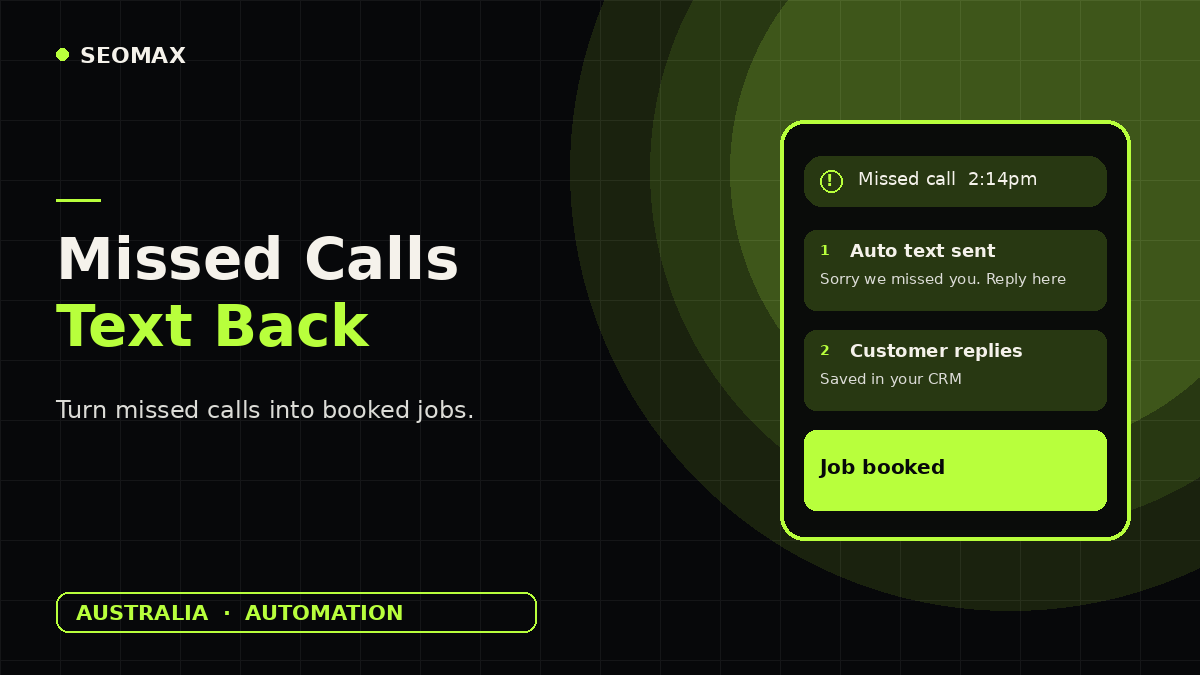
Missed call text back is a simple automation. When someone calls your business number and you do not pick up, they get a text message from your business within moments. The text says sorry you missed them and invites them to reply.
The caller now has a conversation open with you. Many people prefer texting anyway. They can explain the job, send a photo or ask for a quote without waiting on hold.
How it works, step by step
- A customer calls your business number.
- The call rings out, goes to voicemail or comes in after hours.
- The system detects the missed call and sends an automatic text to the caller's mobile.
- The customer replies by text with what they need.
- You, your team or an AI receptionist replies, answers questions and books the job.
- The contact and the whole conversation are saved in your CRM.
For this to work, calls need to come through a business number connected to the software. This is often a new local or mobile number, or your existing number forwarded to it.
What a good auto text says
Keep it short, friendly and clear. Use your business name. Tell the caller what to do next. Here are three examples you can adapt. Replace the words in brackets with your own details.
For a tradie:
"Hi, it's [your name] from [business name]. Sorry I missed your call, I'm on a job right now. Reply here with what you need and your suburb, and I'll get back to you shortly."
For a clinic:
"Hi, thanks for calling [clinic name]. Sorry we couldn't take your call. Reply to this text to book an appointment or ask a question, and our team will help you."
For after hours:
"Thanks for calling [business name]. We're closed right now but we open at [opening time]. Reply with a few details about the job and we'll contact you first thing. For urgent issues, reply URGENT."
A few tips for writing your own:
- Say who you are so the text does not look like spam
- Apologise once and keep it warm
- Ask one clear question, such as what they need or their suburb
- Set an honest expectation about when you will reply
- Keep it to a couple of sentences
Connect it to your CRM
Missed call text back works best inside a CRM. Every caller becomes a contact with their number, messages and job details in one place. Nothing gets lost in your personal phone.
- One inbox: texts, calls, website forms and Facebook messages all in one view
- Pipelines: track each enquiry from new lead to quoted to booked
- Reminders: get a nudge if a lead has not had a reply
- Follow up: send a review request or quote reminder automatically
If your website and CRM work together, every form and call ends up in the same system. Our guide to a small business website with a CRM explains how that setup works.
Add an AI receptionist
A text back starts the conversation. An AI receptionist can carry it on. It can answer common questions, collect job details, check your calendar and book appointments by text or by phone, day or night.
This means a caller who rings at 9pm can be booked in before you wake up. You stay in control. You set the rules, the services you offer and when a human should step in. Read more in our guide to an AI receptionist for tradies.
How to set it up
- Choose your software. Pick a system that includes a CRM, business texting and call tracking in one place.
- Set up your business number. Get a new number or forward your existing one so missed calls can be detected.
- Write your auto texts. Create one for business hours and one for after hours.
- Set your business hours. This decides which message is sent and when.
- Connect notifications. Get an alert on your phone when a customer replies.
- Test it. Call your number from another phone, let it ring out and check the text arrives.
- Train your team. Make sure everyone knows who replies and how fast.
Common mistakes to avoid
- Robotic messages: a cold, generic text feels like spam. Write like a person.
- No one replies: the auto text is only the start. Someone, or an AI receptionist, must follow through quickly.
- Texting marketing to callers: a missed call text should be about their enquiry. Under Australian spam rules, marketing texts need consent and an easy way to opt out.
- Too many texts: one auto text per missed call is enough. Do not send a string of messages.
- Forgetting after hours: make sure the after hours text sets the right expectation.
- Not tracking results: if you do not measure it, you cannot improve it.
If you later want to send offers or reminders to past customers, do it with consent. Our guide to SMS marketing for small business covers how to do that the right way.
How to measure results
Keep it simple. Check a few numbers each month in your CRM.
- Missed calls: how many calls went unanswered
- Reply rate: how many callers replied to the auto text
- Response time: how quickly your team or AI receptionist replied
- Bookings: how many text conversations became booked jobs or appointments
- Revenue: the value of jobs that started as a missed call
Compare these with what happened before. If many callers reply but few book, look at how fast and how well you respond.
How SEOMAX can help
SEOMAX is a Melbourne agency that helps Australian small businesses win more jobs from their phone, website and ads. We set up missed call text back in SEOMAX's own software, along with your CRM, AI receptionist, booking calendar and automated follow up. Everything works together in one place, and we write the messages for your business.
Frequently asked questions
What is missed call text back?
It is an automation that sends a text message to anyone who calls your business and does not get through. The caller can reply by text, so the enquiry is not lost.
Do I need a new phone number?
Not always. Many businesses forward their existing number to a business line connected to the software. Others use a new local or mobile number for their website and ads.
Is missed call text back legal in Australia?
Replying to someone who just called you about their enquiry is generally fine. Marketing messages are different. They need consent and a clear way to unsubscribe under Australian spam rules.
Can it work after hours?
Yes. You can set a separate after hours message. With an AI receptionist, callers can even book an appointment while you are closed.
Does it work for clinics and local services, not just tradies?
Yes. Any business that takes bookings or enquiries by phone can use it, including clinics, salons, cleaners and other local services.
Can SEOMAX set this up for my business?
Yes. We set up missed call text back, your CRM and an AI receptionist for Australian businesses. Book a free demo to see how it works.
Get a free demo
Want to stop losing jobs to missed calls? We will show you how missed call text back and an AI receptionist could work for your business, free and with no obligation. Book your free demo or call 03 8400 0295.